Worked examples
Calculate work hours with unpaid breaks
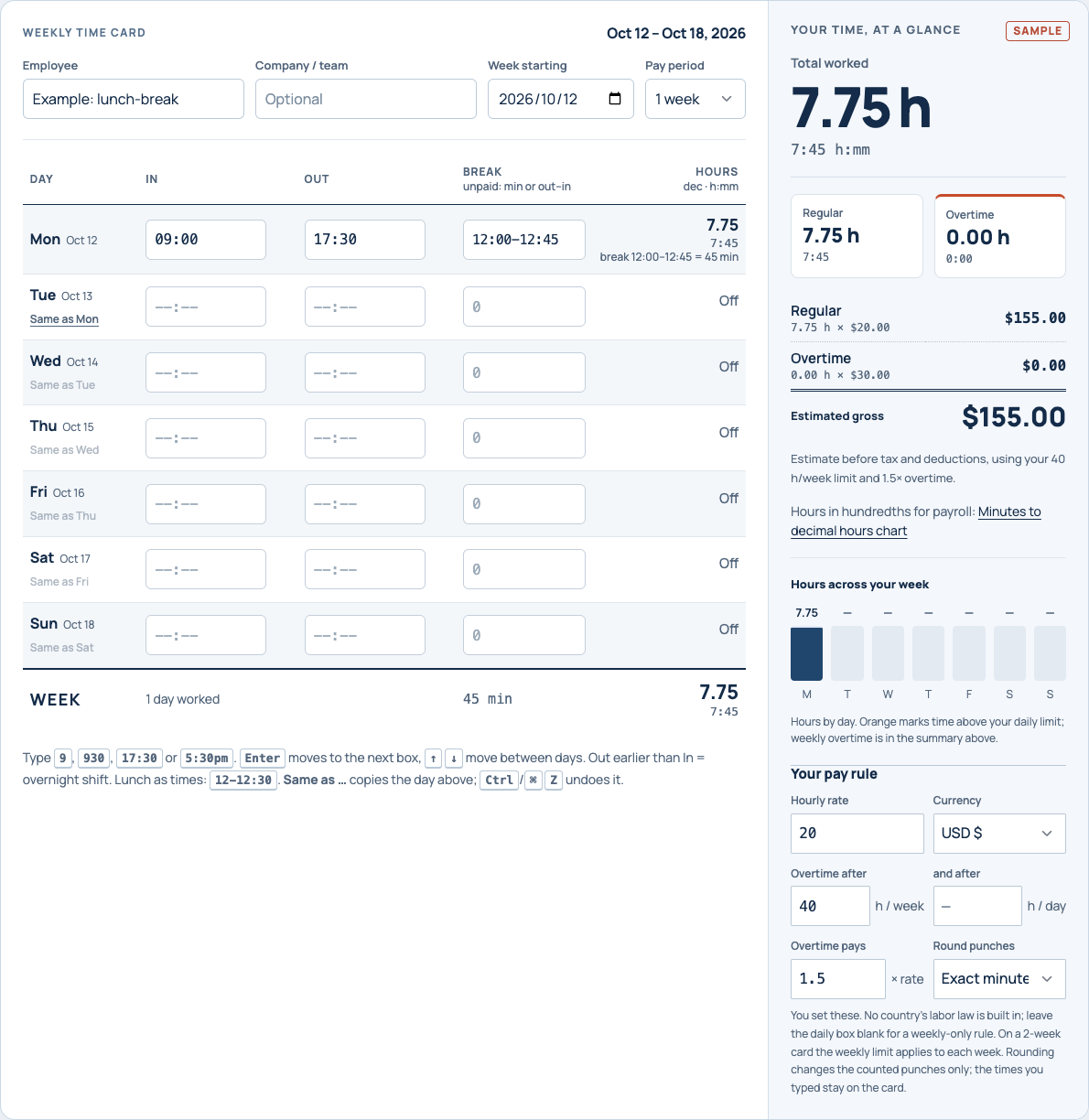
First find the minutes from clock in to clock out, then subtract only the breaks that should be unpaid. Keep the result in minutes until you need a decimal: 09:00–17:30 minus 45 minutes = 465 minutes = 7:45 = 7.75 hours.
1. One unpaid lunch: use minutes or a time range
| Clock in | Clock out | Break entry | Net hours |
|---|---|---|---|
| 09:00 | 17:30 | 45 | 7:45 / 7.75 h |
| 09:00 | 17:30 | 12:00-12:45 | 7:45 / 7.75 h |
17:30 is 1,050 minutes after midnight; 09:00 is 540. The shift is 1,050 − 540 = 510 minutes. Subtract 45 to get 465. Divide by 60 for 7.75 decimal hours. Enter either 45 or 12:00-12:45 in Shiftpad's break box, not both: combining them would deduct the same lunch twice.
2. Several unpaid breaks: add intervals once
For an 08:00–18:00 shift with unpaid periods at 12:00–12:45 and 16:00–16:30, enter 12:00-12:45,16:00-16:30. The elapsed shift is 600 minutes, breaks total 75, and net time is 525 minutes = 8:45 = 8.75 hours.
Using the total 75 gives the same arithmetic. Time ranges make a later review easier because they retain when each break happened. These are illustrative unpaid intervals; whether a particular interval is deductible depends on the actual duties and applicable rules.
3. Across midnight: place the break inside the night shift
Clock in at 22:00 and out at 06:15 the following morning. Count 2 hours before midnight plus 6:15 after it: 8:15 elapsed. An unpaid meal at 02:00–02:45 takes 45 minutes, leaving 7:30 / 7.50 hours. In the calculator use 02:00-02:45; the interval belongs to the next morning within this shift.
Shiftpad puts that row on the day the shift started. A shift crossing your workweek boundary may need to be allocated between workweeks for payroll; the calculator does not split it automatically. Clock changes require another check: see overnight shifts and daylight saving time.
Decide what to deduct before doing the subtraction
A break field cannot decide whether time is legally unpaid. U.S. federal guidance treats short rest periods, generally 5–20 minutes, as hours worked (29 CFR 785.18). Bona fide meal periods require the employee to be completely relieved from duties; duration alone is not sufficient (29 CFR 785.19). State rules and rules outside the U.S. can differ.
Example with a paid rest: 09:00–17:30 includes one 45-minute unpaid meal and a paid 15-minute rest. Deduct 45, giving 7:45. Deducting 60 would remove the paid rest and reduce the result to 7:30.
If someone worked through a scheduled meal, check what actually happened before entering the scheduled deduction. These examples explain arithmetic, not a determination of wages owed.
Three checks that catch an incorrect total
- Overlap:
12:00-12:45,12:30-13:00describes overlapping time. Shiftpad flags it instead of subtracting 75 minutes. - AM/PM:
12-1means 12:00 to 01:00 on the 24-hour clock. For noon to 1 pm, use12-13or12pm-1pm. - Units: type
45or0:45for 45 minutes.0.75is not a supported break entry in Shiftpad. Decimal hours belong in a separate conversion step.
What we tested in Shiftpad
Browser checks on 28 October 2026 used the same synthetic inputs linked above, in this prepared version. Each result was compared with an independent minute calculation. These are functional checks, not measurements from employees or claims about ranking.
| Test input | Expected / displayed | Check |
|---|---|---|
| 09:00–17:30;12:00–12:45 | 465 min /7:45 /7.75 h | Browser and arithmetic |
| 08:00–18:00;45+30 min | 525 min /8:45 /8.75 h | Browser and arithmetic |
| 22:00–06:15;02:00–02:45 | 450 min /7:30 /7.50 h | Browser and arithmetic |
| Overlapping12:00–12:45 and12:30–13:00 | Rejected | Core validation |
| Open an example over a saved card | Saved card stays unchanged until an edit | Browser storage comparison |
Where this helps
Reviewable deductions: a lunch range retains its actual timing, and overlapping ranges are flagged. Traceable units: the card shows h:mm alongside decimal hours. A reusable check: each guide opens the same inputs in the calculator, so you can change one value and see the effect. Calculations and the saved card run in your browser; save a CSV for a portable copy.
Limits: one employee at a time, shifts under24 hours, user-selected pay rules, no automatic split at the workweek boundary and no payroll-provider integration. Exact minute arithmetic is not a legal decision about which time should be paid.
Keep or check the result
Download a blank timesheet · Convert h:mm to decimal hours · Compare punch rounding